Agents. Answered.

Your Mac runs Claude Code. Your iPhone and Apple Watch answer it — approve permissions, pick options, dictate the next task from wherever you are. Your $200/month agent shouldn’t sit idle because you stood up.

Download for Mac Free Download on the App Store

Free to download · unlock remote answering from $9 once  ·  macOS 14+ · iPhone · Apple Watch

MAC + TERMINAL

Run it. Walk away.

Type fob instead of claude. The session lives in a background daemon your terminal merely looks at — detach with Ctrl-\, close the lid, leave.

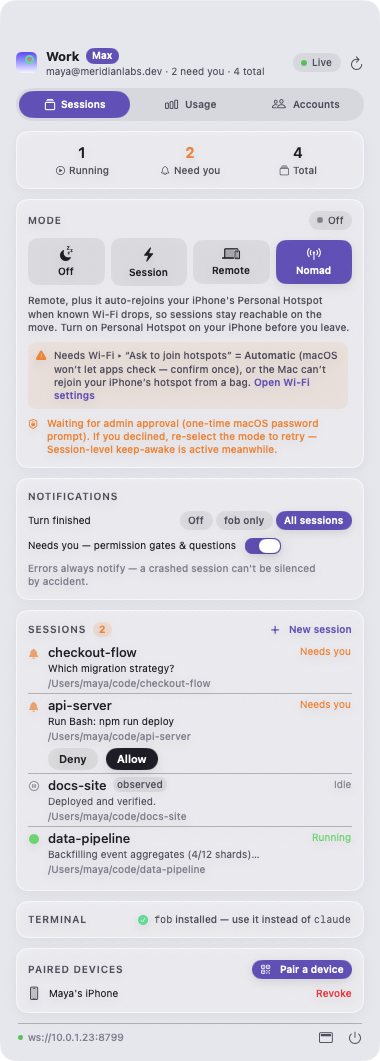
DevFob menu bar — every session, mode, notification and usage in one menu

Everything in one menu: live sessions, the mode dial, notification rules, usage, and paired devices — light or dark, it follows your Mac.

Terminal showing fob detaching a running session

tmux for agents — that your phone can answer

Works in Ghostty, iTerm2, Terminal.app, anything. Same TUI, same keybindings, truecolor preserved. fob attach repaints the session exactly where you left it — and it survives a daemon restart, ready to Resume.

Sessions outlive everything

The daemon is a launchd agent, not a window. Quit the app, crash the GUI, restart it — your sessions don’t notice.

Signal, not noise

Notifications fire on done, needs approval, needs input, and errors. Never on background chatter. Auto-muted while you’re at the terminal.

Reboot? Resume.

Interrupted conversations return as one-tap Resume — context intact — from the phone, the watch, or the menu bar.

LIVE HUD · THE NOTCH

It lives in your notch.

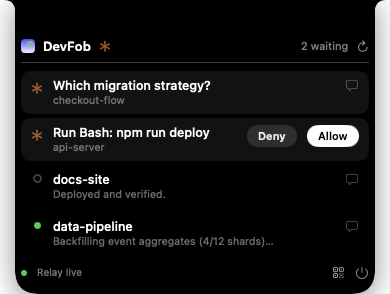
A glanceable HUD unfurls from the notch the moment a session needs you — see what’s waiting, and tap Allow right there. No window to open, no app to switch to.

DevFob notch HUD with two sessions waiting and Allow / Deny

Built for notch MacBooks — folds away to a quiet pill until something actually needs a human.

IPHONE

Your pocket.
The approval queue.

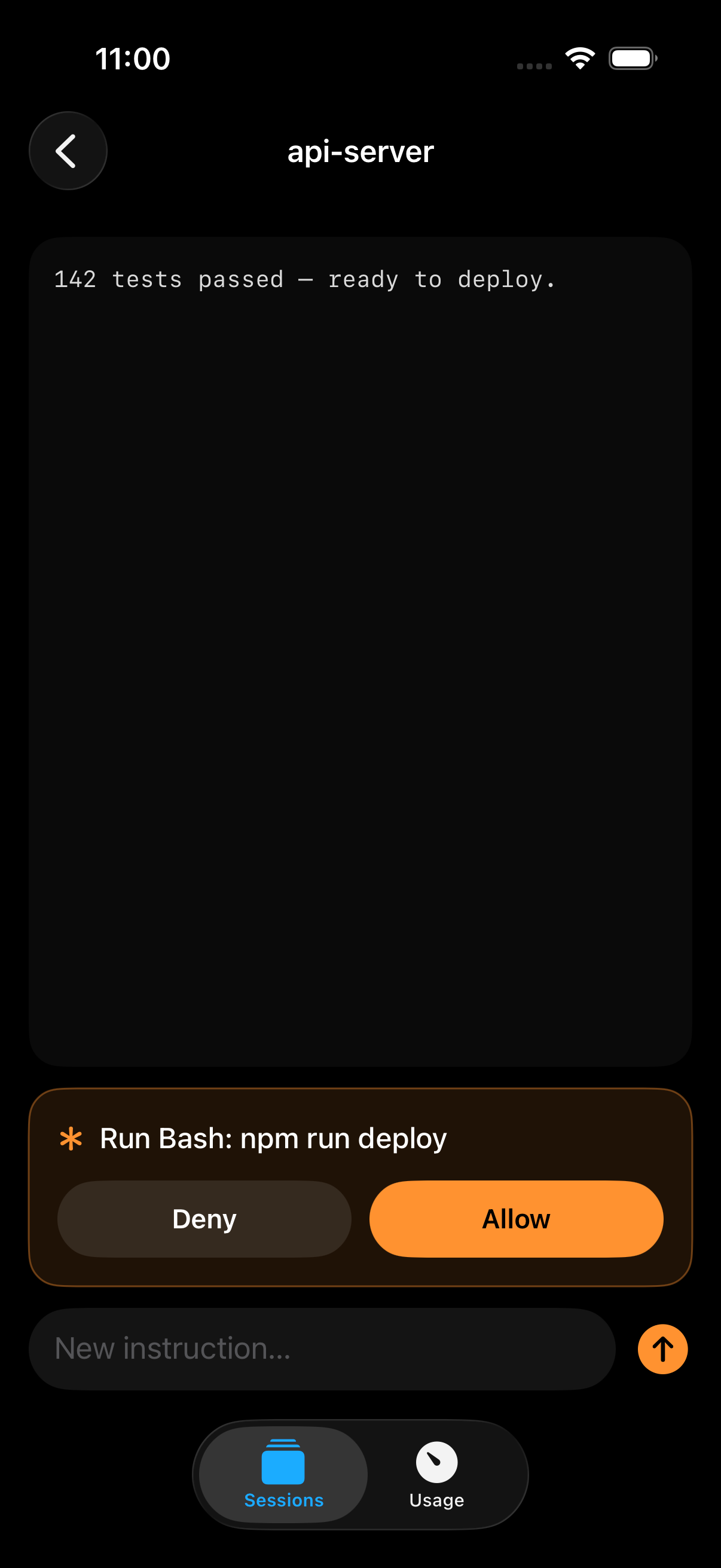
  • Allow or Deny with the real command in front of you — never a blind approve.
  • Real tappable choices — Claude’s actual multiple-choice options, not a generic text box.
  • Answer from the lock screen — Allow / Deny / Reply actions on the push itself.
  • Dictate the next instruction — redirect a session without touching the Mac.
  • Works on hotspot, behind NAT — outbound encrypted connection, no port forwarding.
  • No sign-up — scan a QR from the menu bar and you’re paired.
Download on the App Store

Free on the App Store — it pairs with your Mac, nothing to buy here.

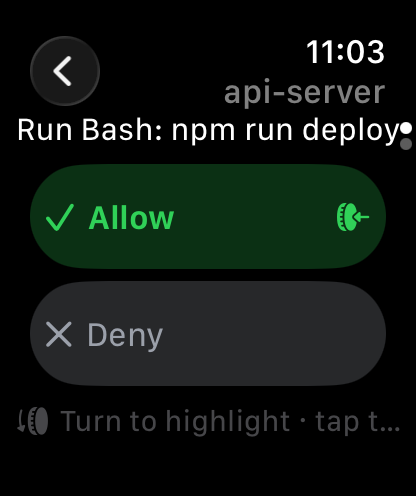
Approving a deploy with the real command shown
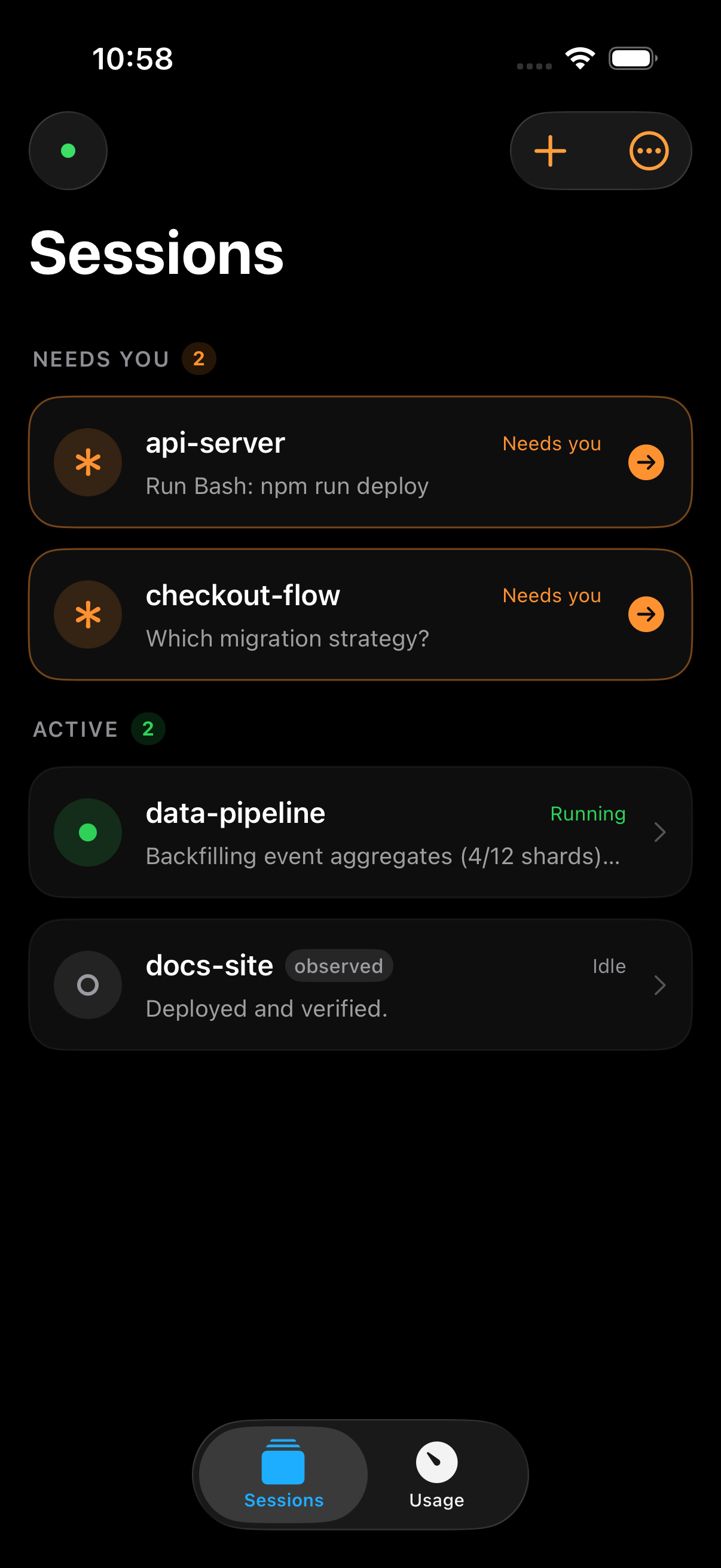
Live session list on iPhone
APPLE WATCH

Two seconds. From your wrist.

The watch you already own becomes the remote for your most expensive subscription.

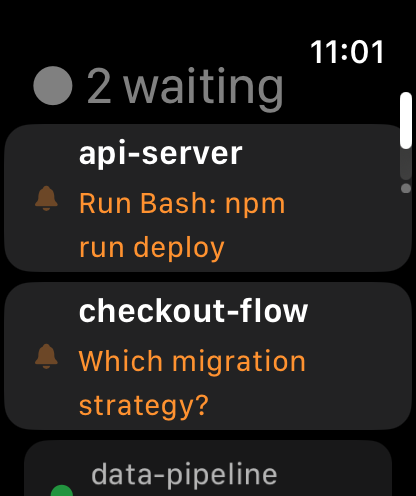
Sessions needing you on Apple Watch

The stack, on your wrist

Crown-scroll every session — which need you, which are running — attention-first.

Allow or Deny from the watch

Approve · pick · dictate

Tap Allow/Deny, choose Claude’s options with the Crown, or dictate a reply into a live session.

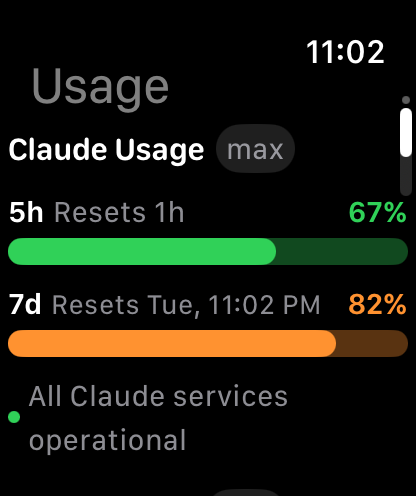
Usage windows on the watch

Usage at a glance

Your 5-hour and weekly windows on the face — and a complication that counts what’s waiting.

DevFob watch complications: session stack, ring count, usage gauge

Three complications — a session stack, a ring with the waiting count, and a usage gauge — so the answer is on your face before you raise your wrist.

NOMAD MODE

Lid closed.
In your bag.
Still working.

Flip on Nomad and your MacBook keeps the agents running with the lid shut, riding your iPhone’s hotspot as you move. The migration finishes on the train — and you approve the deploy from your wrist.

1

Drop the Mac in your bag, lid closed.

2

It auto-joins your iPhone’s hotspot and stays awake.

3

A wrist tap: “api-server needs approval.” You tap Allow.

macOS won’t do this on its own. DevFob does the keep-awake and hotspot choreography honestly — limits stated, never silent.

USAGE & ACCOUNTS

Claude and Codex.
Every account.

  • Both providers, one view — Claude’s 5-hour and weekly windows alongside Codex, on Mac, iPhone, and watch.
  • Never start a big run blind — see what’s left before you kick off the refactor.
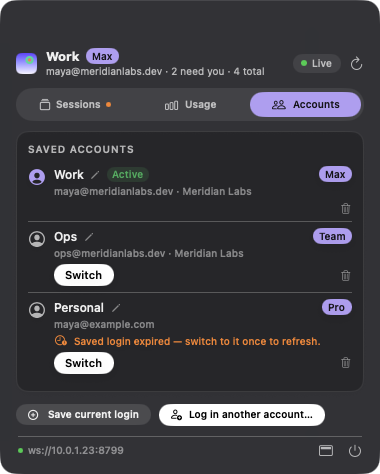
  • Switch accounts when a window runs dry — hot-swap Claude logins from the menu bar and keep shipping.
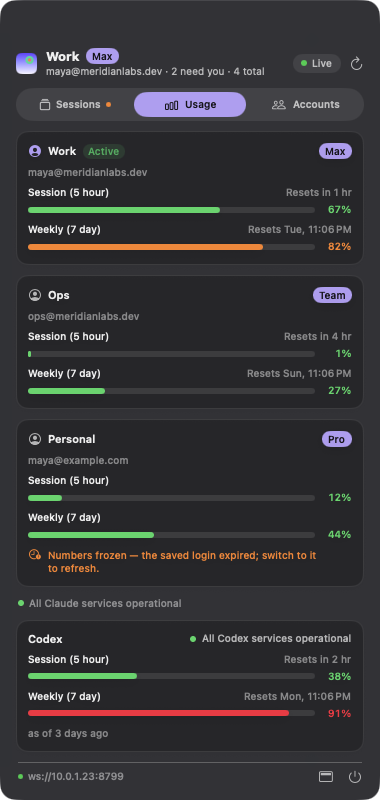
  • Per-account usage — see every account’s remaining window before you switch.
  • Service status — a row tells you when it’s the provider, not you.
Claude and Codex usage windows in the menu bar
Multi-account switching with per-account usage
PRIVACY

No cloud. No accounts.
No telemetry.

The only thing DevFob ever transmits is an end-to-end encrypted conversation between devices you paired yourself. Your code, your prompts, your transcripts — none of it touches the internet in the clear, and none of it ever reaches us. There is no “us” to reach: no server, no sign-up, no analytics.

Paired, not registered

Scan a QR from the menu bar. A Curve25519 handshake pins your devices to each other — no email, no account, no vendor in the loop.

The relay sees ciphertext

Away from home Wi-Fi, frames travel sealed (ChaCha20-Poly1305), replay-guarded and authenticated. The relay can’t read a byte — and you can self-host it.

On your LAN, it’s only your LAN

Same network? Devices talk directly over Bonjour. Nothing leaves the room — provable with a packet capture.

PRICING

One-time. Yours.

No subscription, no account, nothing that stops working if we disappear. Competitors charge $9 a month for remote answering. DevFob is $9 once. Every paid tier has a 30-day no-questions money-back guarantee.

Free

$0

Watch everything. Forever free.

  • Menu-bar monitoring of every session
  • fob CLI — detach, reattach, resume
  • Mac notifications: done / needs you
  • iPhone app, view-only (1 device)
  • Claude usage meter, single account
Download free

Pro

$19

The wrist, the bag, the notch.

  • Everything in Remote
  • Apple Watch app + complications
  • Nomad mode — lid-closed in your bag
  • Notch / Dynamic Island live HUD
  • All keep-awake modes · session resume

Power

$39

Multi-account, multi-Mac.

  • Everything in Pro
  • Multi-account switching, menu bar & phone
  • Per-account usage · Claude + Codex
  • License for up to 3 Macs
  • Priority support & early builds

Team 5-pack — $99

Five Pro seats, one invoice, one key. MDM-friendly deploy, self-hosted relay guide for your infra, and a security story (E2E, no vendor server) that passes review without a meeting. Power add-on $30/seat.

FAQ

Questions, answered.

Does my code or conversation go through your servers?

No — there are no servers. On your own network, devices talk directly. Away from it, frames pass through a relay that only ever sees ciphertext (and you can run that relay on your own box). No accounts, no telemetry, nothing to leak.

Why $9 once when others charge $9 a month?

Because the brand promise is that nothing depends on us. A subscription for a tool whose whole point is “no cloud, no vendor” would be hypocrisy. You pay once, it’s yours, updates for a year are included.

What’s free?

Monitoring is free forever: every session in your menu bar and on your iPhone, the fob command, and your usage meter. Paying unlocks acting remotely — answering from the phone ($9), plus the watch, Nomad, and notch HUD (Pro).

Which terminals work?

All of them. fob runs inside whatever terminal you use — Ghostty, iTerm2, Terminal.app, Alacritty, WezTerm, kitty, tmux — with the same TUI and keybindings. It’s a command, not an app you switch to.

Does it track Codex too, or just Claude?

Both. Claude Code is fully interactive (answer, resume, dictate); usage windows are tracked for Claude and Codex, side by side on the Mac, iPhone, and watch.

Will Nomad mode cook my battery?

Nomad is explicit and honest: you flip it on, the menu bar shows it, the limits are documented. Session mode (plain caffeinate) is the default; aggressive modes ask for a one-time admin grant and never run silently.

DevFob Download Free
The Mac app is free to download today — paid checkout opens soon.