Answer Claude Code from your Apple Watch
Claude Code doesn't need you while it works. It needs you at the exact moments it stops: a permission gate, a plan waiting for approval, a multiple-choice question. A watch turns each of those into a five-second wrist interaction instead of a walk back to the desk. This page explains what that's actually like — and where it honestly falls short. Full disclosure up front: DevFob is our app, and as far as we can tell it ships the only dedicated watchOS app that answers Claude Code rather than just notifying you about it. We'll try to be useful even if you never buy it.
What answering an AI coding agent from a watch is actually like
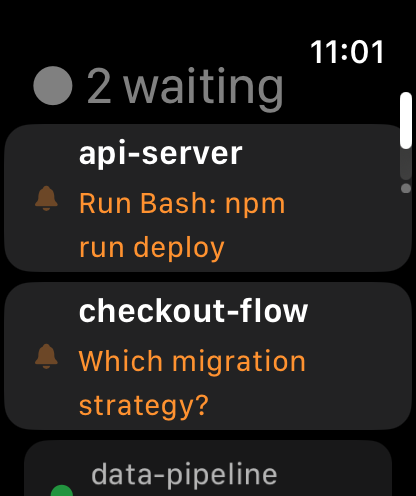
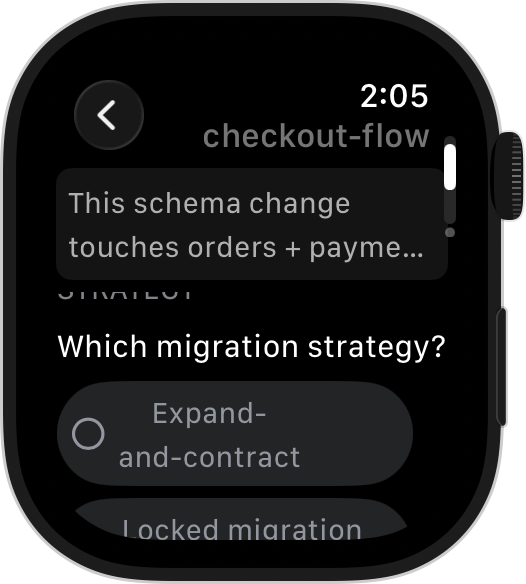
Claude Code (and Codex — DevFob mirrors both) interrupts you in a small number of well-defined shapes, and each one gets its own wrist-sized treatment:
- Permission gates. "Claude wants to run this command — allow?" On the watch this is a Digital-Crown picker: rotate the Crown to move between Allow and Deny (with a haptic click per step), tap to send. About three seconds, phone stays in your pocket. The watch will only send answers the prompt can actually accept — free text never reaches a yes/no dialog.
- Plan approval. When Claude finishes plan mode, the full plan text scrolls on the wrist — not a truncated notification. Approve with a tap, reject, or dictate a sentence of feedback that goes back with the rejection ("skip the migration, just patch the query").
- Multi-choice questions. Claude's structured questions (AskUserQuestion) render as a real form: one question at a time so it stays glanceable, tap options to toggle — checkmarks on multi-select, exclusive on single-select — an "Other…" row that opens dictation, and Send submits the whole structured answer in exactly the same shape the Mac and iPhone apps send.
- Freeform prompts. When Claude just wants text, you get dictation plus canned replies ("yes, continue", "looks good"). Honest framing: dictation is fine for a sentence, not for a paragraph of new instructions.
- The watch face itself. A complication shows how many sessions are waiting on you, so "is anything stuck?" is answerable without opening anything.
Watch or phone? An honest breakdown
The watch is not a small phone. It wins some moments outright and loses others outright:
| The moment | Apple Watch | iPhone |
|---|---|---|
| Permission gate | Wins. Crown to Allow/Deny, tap, done. No unlock, no app-hunting. | Fine — but it means getting the phone out for a two-option question. |
| Approve a short plan | Wins. Plan text scrolls on the wrist; approve or dictate feedback. | Also fine; overkill for a ten-line plan. |
| Approve a long plan | Readable but slow — lots of Crown scrolling. | Wins. A long plan is simply nicer on a bigger screen. |
| Multi-choice form | Good. One question per screen, tap to toggle, dictate "Other…". | Better for forms with many questions — you see everything at once. |
| Write a fresh prompt | Dictation and canned replies only. | Wins. A real keyboard. The watch is for answering, not authoring. |
| Read output / diffs | Glanceable status only. | Wins. Proper transcript reading needs a phone or the Mac. |
| Knowing something needs you | Wins. Haptic tap + complication count. Hardest alert to miss. | Notifications work, but phones get silenced and left in bags. |
When the wrist genuinely beats the phone
The pattern in that table: the watch wins whenever the answer is a decision, not a composition. Concretely, the moments watch-answering earns its keep:
- You kicked off a long run and went to make coffee, cook, or walk the dog. The tap on the wrist says a permission gate is up; the Crown answers it; the run never stalls.
- Your phone is charging in another room. The watch mirrors through it anyway — the phone doesn't need to be on you, just powered on and on the network.
- You're in a meeting. Glancing at a wrist and tapping Approve is socially survivable in a way that pulling out a phone isn't.
- Multiple sessions in flight: the complication tells you whether anything is blocked before you decide whether to context-switch at all.
The honest limits
- Every watch app talks through the phone — including ours. Apple doesn't give watchOS apps general-purpose access to raw network sockets on real hardware — Technote TN3135 limits low-level networking to narrow cases like active audio streaming — so the watch mirrors the iPhone app over WatchConnectivity. If your iPhone can't reach your Mac, neither can your watch. There is no standalone-LTE mode; a watch app that kept a direct persistent connection to your machine would be fighting the platform.
- DevFob is local-network software. Phone and Mac talk directly over your LAN or the Mac's own hotspot (Nomad mode keeps a lid-closed MacBook awake and reachable in a bag). There's no vendor cloud by design — which also means no answering from a café across town unless you self-host a relay. If anywhere-on-the-internet access matters more to you than session privacy, a hosted relay is the right tool; see every way to run Claude Code from your phone.
- Reading on a watch is skimming. Plans and questions read fine. Reviewing an actual diff does not. The watch tells you a decision is needed and takes the decision; code review stays on bigger screens.
- Writing on a watch is dictating. One corrective sentence, yes. A carefully worded three-paragraph prompt, no.
Where the alternatives are honestly better: if all you want is to know Claude stopped — not to answer it — any phone tool's push notifications mirror to the watch for free, and that may be enough for you. And hosted relays like Omnara work over any internet connection from anywhere; their alerts land on your wrist too, even though answering generally means opening the phone app. If anywhere-access beats wrist-answering for you, that's the better pick — our full comparison is at DevFob vs Omnara.
Where DevFob's watch app is the better pick: you want to answer — approve plans with the plan text in front of you, fill multi-choice forms, clear permission gates — without touching the phone, and you want session content to stay on your own network while you do it.
Is DevFob really the only Apple Watch app for Claude Code?
As of July 2026, we can't find another dedicated watchOS app that answers Claude Code — the alternatives forward notifications to the wrist (via their phone apps, or Slack/Telegram bots) and send you to the phone to respond. If we're wrong, or this goes stale, tell us and we'll amend this page.
The same is true on the other wrist: DevFob ships a free Wear OS companion as well, paired with the Android phone app (currently in closed beta).
What it costs, and what happens to your data
DevFob is a Mac menu-bar app: $29 once, 14-day full trial, free updates. The iPhone, Apple Watch, Android, and Wear OS companions are free. No account anywhere, no cloud, zero analytics in the apps; devices pair with Curve25519 and every frame is sealed with ChaCha20-Poly1305, so session content never touches our servers — we don't have any. Even the license check is an offline Ed25519 signature. It also watches your Claude rate limits per account and can auto-switch to a login with headroom before a run stalls — which matters more, not less, when you're steering from a watch.
Requires macOS 14+ on the Mac and the free DevFob iPhone app (the watch app installs with it). Claims about other tools reflect their public docs as of July 2026 and may change. Spotted something outdated or unfair here? Tell us and we'll fix it.