Track your Claude Code usage and rate-limit windows
There are four sensible ways to see how much Claude Code usage you have left before a window closes on you. Two are free and built in, one is a well-loved open-source CLI, and one is ours. Here's what each actually shows — and an honest read on when each one fits.
First, know what you're measuring
Claude subscription plans (Pro, Max, Team seats) meter usage in two rolling windows: a session window measured in hours — commonly described as a ~5-hour window that starts at your first prompt — and a longer weekly ceiling on top. The two are independent: you can have plenty of session headroom left while the weekly window is nearly full, or the reverse. Anthropic reports both as a utilization percentage with a reset time, not as a token count, and exact quotas vary by plan and change over time. If you want the full picture of how the windows behave and how to stop losing long runs to them, we wrote that up separately: Claude Code rate limits, explained practically.
Every tool below is ultimately showing you some view of those two windows — or of the raw token traffic underneath them.
Option 1 — Built in: /usage and your plan usage page
The zero-install answer, and the only one that reads Anthropic's own numbers:
- Inside Claude Code, type
/usage. On a subscription login it shows how full your current session window and your weekly window are, with reset times (the same view is also reachable from/status). If you authenticate with an API key and pay per token instead, there's no plan window to show — you track spend in the Anthropic Console. - In the browser: claude.ai/settings/usage. The same session and weekly utilization as bars with reset times; on some plans it also breaks out a separate weekly line for the most expensive model tier.
The catch: both are snapshots you have to remember to check, and they show one logged-in account at a time. Perfectly fine if you check before kicking off a long run; useless the moment you're away from the keyboard or juggling two logins.
Option 2 — ccusage: open-source analytics from your local transcripts
ccusage is an open-source CLI
(by ryoppippi) that has become the default answer to "where did my usage go?" Run it with no
install: npx ccusage. It reads the JSONL transcript files Claude Code already writes
to your machine (under ~/.claude/projects/) and turns them into reports:
- Daily / weekly / monthly / per-session token and estimated-cost breakdowns, with per-model detail and cache tokens counted separately.
blocksgroups usage into 5-hour billing windows. (Older versions had ablocks --livedashboard; it was removed in v18 in favor of the statusline below.)- A compact statusline integration (beta) for Claude Code's status bar, and it can read logs from other agent CLIs too, including Codex.
Honest caveats, which the project itself is upfront about: the dollar figures are
estimates priced at API list rates — a "what this would have cost on the API" number,
not a bill (your subscription is flat-rate). And because Anthropic doesn't publish plan quotas
as token counts, ccusage can't authoritatively tell you how much plan headroom remains — for
that, the source of truth is still /usage. It also only sees the machine it runs
on. Within those limits it's excellent, free, and the right tool for understanding your usage
patterns over time.
Option 3 — Put it in your statusline
Claude Code has a first-class statusline mechanism: you point a setting at any shell
command, Claude Code pipes it a JSON blob on every update (model, working directory, session
cost, context-window usage — and, on subscription logins, rate-limit utilization for the 5-hour
and weekly windows), and whatever your script prints becomes a persistent line at the bottom of
the terminal. The fastest path: type /statusline and describe what you want — Claude
Code writes the script for you. See the
official statusline docs
for the exact JSON fields, which evolve between versions.
There's a healthy ecosystem of community statusline scripts, and ccusage's beta statusline
slots in here too. This is the best free option if you live in one terminal and want the numbers
always visible rather than a /usage check you have to remember.
The catch: it's visible only inside that terminal, on that machine, for the account that's logged in. Close the lid or walk away and the information walks away with you.
Option 4 — DevFob: live per-account meters, off the terminal
Disclosure: DevFob is our product. This whole site is ours, so weigh this section accordingly. DevFob is a Mac menu-bar app that mirrors your Claude Code (and Codex) sessions to iPhone, Apple Watch, and Android — and its usage view is the part relevant here:
- Live meters for both windows, per account. The 5-hour session window and the weekly window, for every Claude login you keep — side by side in the Mac menu bar and the notch HUD, and on the free iPhone and Apple Watch companion apps (Android and Wear OS companions are in beta). You see a wall coming from the couch, not just from the terminal.
- Auto-switch. If you keep more than one account, DevFob can switch to the login with the most headroom the moment a window fills, so a long run continues instead of stalling.
- The rest of the app is remote control for the sessions themselves: answer the agent's multi-choice questions, approve plans, and clear permission gates from your phone or watch, with a Nomad mode that keeps working lid-closed.
- Privacy posture: LAN/hotspot direct between your own devices, end-to-end encrypted (Curve25519 pairing, ChaCha20-Poly1305), no cloud relay, no account to create, zero app analytics. macOS 14 or newer on the Mac; the mobile companions are free.
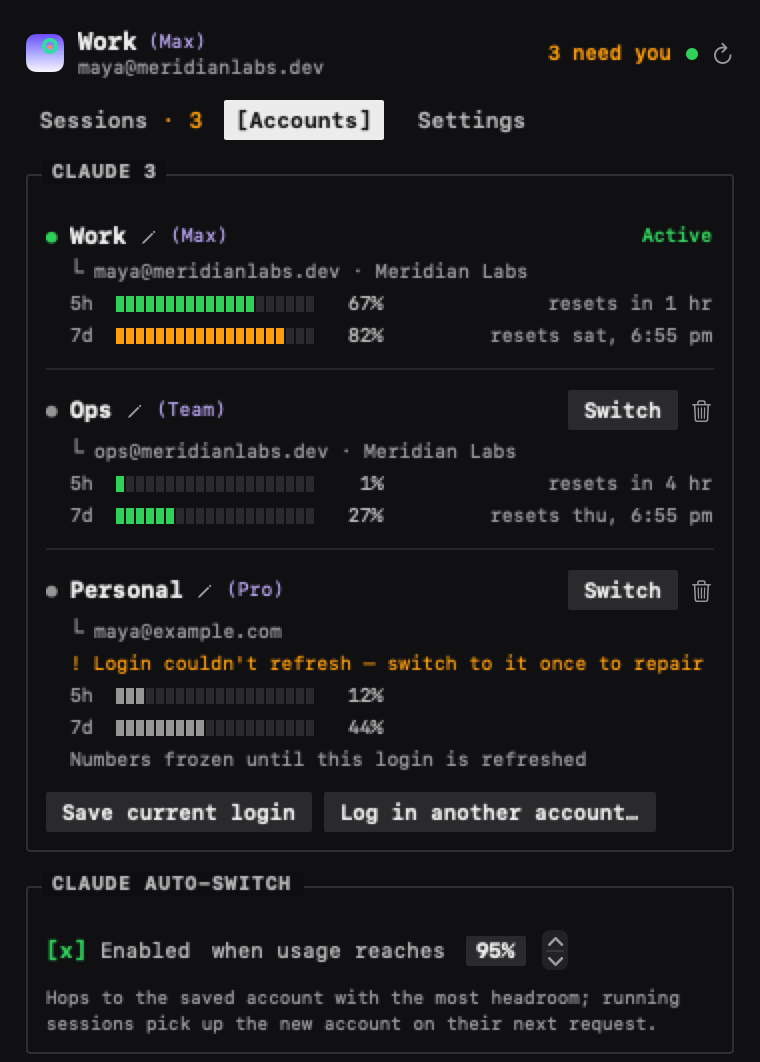
If you landed here searching for a ccusage alternative, be precise about what you want: ccusage is retrospective analytics from local files, and it's great at that. DevFob is a live gauge of actual plan headroom across accounts and devices, plus the auto-switch. They answer different questions and coexist happily.
When each fits
| Your situation | Use | Cost |
|---|---|---|
| You occasionally want to check headroom before a long run | /usage or claude.ai/settings/usage | Free, built in |
| You want history: tokens, sessions, per-project trends, "what would this cost on the API" | npx ccusage | Free, open source |
| You live in one terminal and want the numbers always on screen | /statusline (or ccusage's statusline) | Free, built in |
| You juggle multiple accounts, leave the desk mid-run, or want auto-switch when a window fills | DevFob | $29 once, 14-day trial |
To be plain about it: if you run one account and stay at the keyboard, the free options
cover you completely. Start with /usage, add a statusline if you want it
ambient, add ccusage if you want history. DevFob earns its $29 when you keep more than one
login, want the meters on your wrist or phone, or want the switch to happen without you.
Accurate to the best of our knowledge as of July 2026. Claude Code features, ccusage behavior, and plan limits all change; check the linked docs and repos for current details. Something wrong here? Tell us.